Selectable criteria that allows you to interrogate the data and list the specific games that match your parameters.
Query Options
Both the home and away teams each have five Pre-match filter groups from which to choose.
For the Home Team your query can be against home matches only or all matches and for the Away Team the option is for away matches only or all matches.
A powerful feature is the 'All Teams' query, which allows you to model all teams within a league using the Home or Away teams form (click the 'All Teams' button).
The 'Reset' buttons at the bottom of the screen enable you to refresh all filters on the page or to reset Home and Away filters independently.
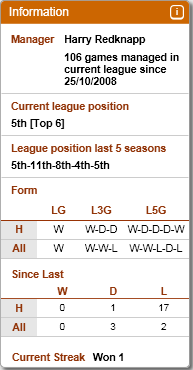
An information panel for each team displays the following statistics,
|
|
|
Select your filters for the Home Team and select the 'Home', 'All' or 'All Teams' button
Select your filters for the Away Team and select the 'Away', 'All' or 'All Teams' button
Click the 'Generate Report' button
Click the 'Query Output' tab to view the report
A report detailing the matches of the two featured teams competing directly with each other since season . Please note that the 'Head To Head’ report disregards all filters.
Click the 'Head To Head' button
Click the 'Query Output' tab to view the report